Winstep

Software Technologies


 Winstep Forums


Print view
Board index : Winstep Forums : General Discussion  [ 3 posts ]
Author Message
 Post subject: Nexus: Don’t open Explorer windows under This PC in NavPane?
PostPosted: Fri Mar 06, 2026 2:35 am 
Offline
User avatar

Joined: Thu Mar 05, 2026 11:36 am
Posts: 5
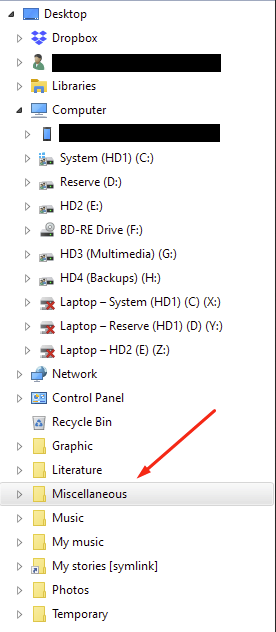
Back in the day, I used Stardock ObjectDock (before later switching to Nexus) on Windows 8 and earlier, and when I launched a File Explorer window from the dock, it would open under Desktop in the Navigation Pane, same as when it’s opened from the actual desktop:

Image

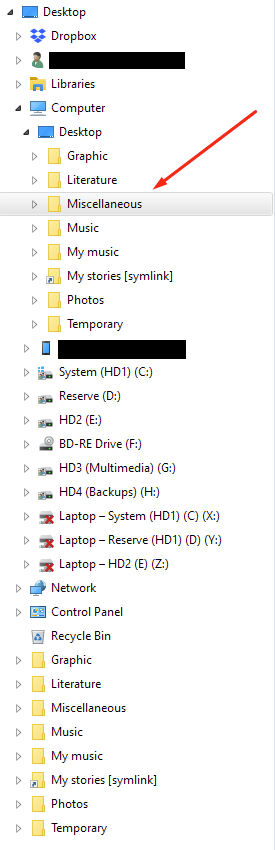
However, since moving to Windows 10, for both ObjectDock and later Nexus, launching a File Explorer window from the dock opens it under a virtual “Desktop” that appears under This PC:

Image

I’m aware this is just a thing that Win10 does, with Nexus and a few other apps. But since Nexus is the app I use most often, I was hoping someone here might have some insight.

So: Does anyone know if there’s any way, some setting or tool or registry hack or anything at all, that restores the pre-Win10 behavior of opening directories under the root Desktop item in the Navigation Pane rather than under a virtual Desktop under This PC when using apps like Nexus?

Windows 10 Pro (x64) v22H2 (w/ “Aero10: Seven” theme by vaporvance)
Winstep Nexus v26.1
OldNewExplorer v1.1.9.0 (“Use libraries; hide folders from This PC”)


Back to top
 Profile  
 
 Post subject: Re: Nexus: Don’t open Explorer windows under This PC in NavP
PostPosted: Fri Mar 06, 2026 7:31 am 
Offline
Site Admin
Site Admin
User avatar

Joined: Thu Feb 26, 2004 8:30 pm
Posts: 12942
Noc wrote:
OldNewExplorer v1.1.9.0 (“Use libraries; hide folders from This PC”)


When Nexus (or OD, or any other application) opens a Explorer window, the actual contents of that Explorer window are not the responsibility of the launching application but Windows itself.

This would thus be a question better directed at Microsoft than Winstep, and I was going to say it might be a 32 bit vs 64 bit issue when I noticed your OldNewExplorer extension.

So I fired up a Windows 10 VM I have here and the Navigation pane structure looks NOTHING like ANY of your two screenshots. It actually looks like this:

Attachment:
Screenshot 2026-03-06 072947.png
Screenshot 2026-03-06 072947.png [ 39.96 KiB | Viewed 54 times ]

So, if I had to take a guess, I would guess "OldNewExplorer" is the culprit.

_________________
Jorge Coelho
Winstep Xtreme - Xtreme Power!
https://www.winstep.net - Winstep Software Technologies


Back to top
 Profile WWW 
 
 Post subject: Re: Nexus: Don’t open Explorer windows under This PC in NavP
PostPosted: Fri Mar 06, 2026 8:44 am 
Offline
User avatar

Joined: Thu Mar 05, 2026 11:36 am
Posts: 5
Just to clarify, this is not OldNewExplorer’s doing; ONE simply removes the folders that appear under This PC by default (“3D Objects”, “Documents”, “Downloads”, etc.) and replaces them with “Libraries” in the navigation pane.

Also, I apologize for the confusion, but I did forget to mention a few more ways I’ve customized my navigation pane. First, I enable “Show all folders” in the navigation pane settings, which groups everything (except Quick Access) under a root “Desktop” item. Then I use Winaero Tweaker to unpin unwanted items such as Quick Access. Finally, I use Open-Shell’s Classic Explorer to add a few minor visual tweaks, such as disabling the arrow buttons fading.

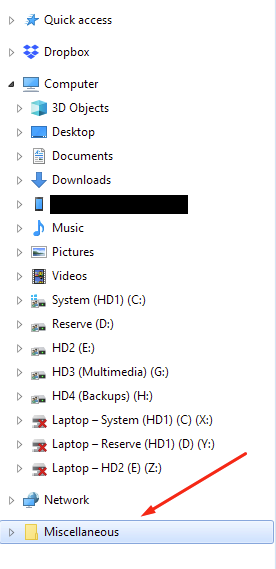
However, none of these customizations affect the behavior I’m describing here. For example, when I disable all these customizations (reverting my navigation pane to something similar to your screenshot) and then open a folder from my desktop, it looks like this:

Image

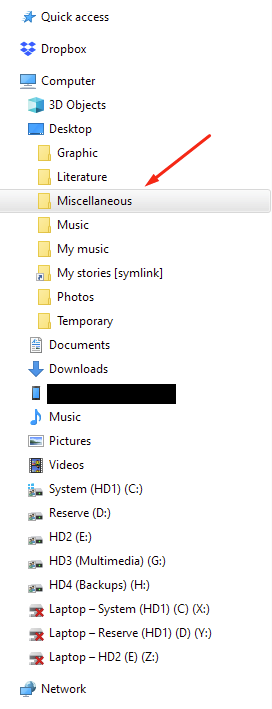
And when I open that folder from Nexus, it looks like this:

Image

As I said in my OP, I’m aware this is an issue with how Windows itself works; I’m not saying Nexus is malfunctioning or anything. I was just hoping that, since Nexus is affected by it, perhaps someone else in this forum might also have been bothered by folders opening under this virtual “This PC > Desktop” and might have found a solution to stop it. Though I can also understand if the issue I’m talking about is too niche for most people to notice (or be bothered by).


Back to top
 Profile  
 
Post new topic Reply to topic Board index : Winstep Forums : General Discussion  [ 3 posts ]
Display posts from previous:  Sort by  

Who is online

Users browsing this forum: Amazon [Bot], GPT [Bot] and 24 guests


You cannot post new topics in this forum
You cannot reply to topics in this forum
You cannot edit your posts in this forum
You cannot delete your posts in this forum
You cannot post attachments in this forum

Search for:
Jump to: