Winstep

Software Technologies


 Winstep Forums


Print view
Board index : Winstep Forums : General Discussion  [ 199 posts ] Go to page Previous  1 ... 8, 9, 10, 11, 12, 13, 14  Next
Author Message
 Post subject: Re: So, what's next after v26.6 ?
PostPosted: Wed Sep 16, 2026 3:48 am 
Offline
Site Admin
Site Admin
User avatar

Joined: Thu Feb 26, 2004 8:30 pm
Posts: 13470
New Betas of v26.9 (Beta 10) are out:

Winstep Xtreme beta:
https://www.winstep.net/xtreme-beta.zip

Nexus Ultimate beta:
https://www.winstep.net/ultimate-beta.zip

Nexus free beta:
https://www.winstep.net/nexus-beta.zip

This is a beta and MUST be installed ON TOP of a full v26.6 OR LATER installation. Do NOT uninstall anything first, just exit all running Winstep applications and run the beta setup file.

There is no need to backup your settings first, but it does not hurt if you do either.

###

This should be the last beta before the official release.

This beta includes several improvements to Shelf interaction, including allowing horizontal icon spacing down to 2 pixels, fixing icon hit-testing at small icon sizes and tight spacing, and preventing launch, attention and delete effects from overwriting neighbouring icons. Multi-selection was also improved so more of the empty Shelf area can be used to draw a selection rectangle without interfering with the resize zones.

Several per-monitor DPI and Windows 11 related issues were also addressed, including labels being cropped below slider controls on secondary monitors, controls being laid out incorrectly when moving between monitors with different scaling factors, and improved Windows 11-style window previews with faster animation and thumbnail sizing closer to the native Windows 11 taskbar. A new troubleshooting option also restores the workaround for the Windows 11 bug that can cause inflated per-process CPU usage after sleep or resume.

Drag & drop received a number of fixes and improvements, including mouse wheel scrolling during internal drag & drop operations, correctly copying application items when dragged from docks or Shelves into Explorer, cleaning up drag images and Shelf state when a drag is cancelled with ESC, and better foreground handling for docks, sub-docks and Grid Stacks invoked from NextSTART or via hotkeys. ALT+Screenshot foreground-window capture was also improved to work correctly with modern hardware-accelerated windows.

This beta also includes further performance and internal cleanup work, particularly around taskbar handling, global hotkey and housekeeping checks, and iconic module rendering, substantially reducing the overhead of frequently executed monitoring and timer-related code. Histogram-style iconic modules, for instance, are now about 20% faster to render.

_________________
Jorge Coelho
Winstep Xtreme - Xtreme Power!
https://www.winstep.net - Winstep Software Technologies


Back to top
 Profile WWW 
 
 Post subject: Re: So, what's next after v26.6 ?
PostPosted: Wed Sep 16, 2026 7:15 pm 
Offline
Site Admin
Site Admin
User avatar

Joined: Thu Feb 26, 2004 8:30 pm
Posts: 13470
Hmmm, NextSTART is *sometimes* silently crashing on exit and I haven't been able to figure out why yet... it's not the code, the crash happens after the code has finished running and VB is cleaning up house.

_________________
Jorge Coelho
Winstep Xtreme - Xtreme Power!
https://www.winstep.net - Winstep Software Technologies


Back to top
 Profile WWW 
 
 Post subject: Re: So, what's next after v26.6 ?
PostPosted: Thu Sep 17, 2026 1:04 am 
Offline
Site Admin
Site Admin
User avatar

Joined: Thu Feb 26, 2004 8:30 pm
Posts: 13470
Looks like I fixed the NextSTART crash on exit...

And in the mean time... Remember when I added the ability to colorize individual tabs in v25.9 ?

Image

Ok, so today I run into some old screenshots of Dragthing and went looking for what had happened to it. DragThing was a long‑running macOS dock and launcher that predated Apple’s own Dock (it actually also served as inspiration for WorkShelf at the time).

DragThing was pretty popular back then for macOS users, letting them create highly customizable floating docks, tabbed docks, and pop‑up windows to organize apps, files, folders, scripts, and even URLs.

Image

DragThing was written in Carbon, and Apple completely removed Carbon UI support in macOS Catalina. The developer chose not to rewrite it in Cocoa as it would take more than a year to do so and would have prevented him from working on what was bringing him the most revenue at the time, so the app effectively reached end‑of‑life.

DragThing died in 2019 because Apple is not big on backwards compatibility.

Let this also be a warning to all those who think Windows should be re-written from scratch and dump backwards compatibility, which is mostly what makes Windows, Windows. They imagine a clean OS, modern APIs, no legacy baggage, perfect performance, perfect stability, but they forget the cost:

Millions of apps die instantly.

Anyway, as JayZ so eloquently and frequently puts it, I digress...

DragThing itself is gone, but two modern apps explicitly continue its spiritual concept: DockThings and SwiftStrip.

Now, I have a recent customer who has been trying to reproduce the look and behavior of his old RipBar setup using a vertical Shelf. Just today, after spending 15 to 20 hours experimenting with the settings, he asked whether he could make the tab strip use the same blue background as the body of the Shelf.

Unfortunately, with the theme he was using, that would require manually recoloring the theme bitmaps. But his request got me thinking about the visual relationship between the tabs and the Shelf body.

Then, while looking at screenshots of DockThings, I noticed how good it looked when the body of a multi-colored tabbed dock matched the color of the selected tab.

Nearly all WorkShelf themes rely on bitmap artwork, with the theme author deciding the colors, shapes and other visual details. But there is another way of doing things: letting users choose the colors of individual tabs and even the shape of the tabs themselves from a handful of available styles.

In other words, simple color-based themes that users can quickly create themselves, instead of being forced to choose among hundreds or even thousands of third-party themes.

WorkShelf does not currently support this type of user-created theme.

And then it hit me: WorkShelf can already colorize individual tabs, so why not optionally allow the Shelf body to automatically match the currently selected tab as well?

So, one thing led to another and... OMG! Look at this:

Attachment:
Shelf-tab-colorization-vertical.png
Shelf-tab-colorization-vertical.png [ 37.72 KiB | Viewed 2488 times ]


I added a new “Colorize Shelf Body with Active Tab Color” setting to the Tab Colorization dialog. The Shelf can now colorize its body using the color assigned to the active tab. Switch tabs and the body changes color with it.

Of course, not all themes are suitable for this type of colorization (and the result also depends on the colorization method used), but the BackInTime theme used above works particularly well with tint. With a suitable theme, this already provides much of the user control offered by those simpler themes.

Sometimes all it takes is a customer asking for one thing, an old application providing the inspiration, and me getting completely sidetracked when I am supposed to be finishing a release. LOL

And, with the colorization options WorkShelf now has, it should be possible in the future to go even further and provide those simple user-configurable themes while retaining the current bitmap-based theme system.

All that would be required is a handful of simple themes offering different tab styles, designed specifically to be colorized and included with the application by default. Users could then choose their preferred tab style and assign their own colors to each tab, with the Shelf body automatically following the active tab.

_________________
Jorge Coelho
Winstep Xtreme - Xtreme Power!
https://www.winstep.net - Winstep Software Technologies


Back to top
 Profile WWW 
 
 Post subject: Re: So, what's next after v26.6 ?
PostPosted: Thu Sep 17, 2026 2:26 am 
Offline
User avatar

Joined: Wed Jun 24, 2026 7:47 pm
Posts: 113
Respected Jorge! Did I understand correctly that this Tab Colorization feature (Colorize Body Field with Active Tab Color) is not yet available in the latest version 26.9 (beta version 10)? When will she appear in the program? :lol:


Back to top
 Profile  
 
 Post subject: Re: So, what's next after v26.6 ?
PostPosted: Thu Sep 17, 2026 4:20 am 
Offline
Site Admin
Site Admin
User avatar

Joined: Thu Feb 26, 2004 8:30 pm
Posts: 13470
Yes, you understood correctly.

And dunno. In the official release for sure.

_________________
Jorge Coelho
Winstep Xtreme - Xtreme Power!
https://www.winstep.net - Winstep Software Technologies


Back to top
 Profile WWW 
 
 Post subject: Re: So, what's next after v26.6 ?
PostPosted: Thu Sep 17, 2026 9:46 am 
Offline
User avatar

Joined: Thu Sep 08, 2016 10:10 pm
Posts: 861
winstep wrote:
Users could then choose their preferred tab style and assign their own colors to each tab, with the Shelf body automatically following the active tab.


This is looking really good.

Well I suppose that's less work in workshelf. I should consider making bland ones and the user can do what they like.

You could go full hog and make it across the board. User could choose menu color, wallpaper color hue/tint, nexus color(s), all from one central point. I know that's daunting and a lot of work, but if they can hue change / tint everything, then you've fully achieved it.

_________________
"They teach you there's a boundary line to music. But, man, there's no boundary line to art."
-Charlie Parker

“We can't expect a blind man to appreciate beautiful patterns or a deaf man to listen to bells and drums.”
― Zhuangzi


Back to top
 Profile  
 
 Post subject: Re: So, what's next after v26.6 ?
PostPosted: Fri Sep 18, 2026 12:46 am 
Offline
Site Admin
Site Admin
User avatar

Joined: Thu Feb 26, 2004 8:30 pm
Posts: 13470
BassdudeNZ wrote:
Well I suppose that's less work in workshelf. I should consider making bland ones and the user can do what they like.


Don't. That would be a mistake - the vast majority of users like the complexity of new themes.

Some users, however, are not interested in whiz-bang visuals. They want something simple and functional, and what WorkShelf currently does not offer by default are plain vanilla Shelf themes - more like pre-existing "styles" or "templates" - using simple solid colors.

Take a look at the front page of DockThings to understand what I mean:

https://www.syniumsoftware.com/dockthings

See? A handful of simple Shelf-only themes, each with different tab styles and body shapes - rounded corners, rectangular bodies, and so on - like those shown in the "Templates and a Variety of Designs" section. These basic Shelf themes could then be colorized by users however they wished to suit their needs, effectively serving as templates.

How each of these template themes should look depends on the colorization method you want the user to apply, or whichever method produces the best results. I would use a single soft color or gradient if the theme is intended to be hue-shifted. Otherwise, use grayscale tones, which are ideal for the tint colorization method.

With separate tab and Shelf-body colorization now available, together with the different colorization methods and the ability to align tabs to the left, center, or right, users would be able to produce a wide variety of clean, simple styles from only a handful of basic template themes.

So please don't make your normal themes bland. Keep making the detailed themes you are known for. These simple templates would be an additional category intended for users who prefer a more minimal and functional appearance.

That said, if you would like to create some of these basic Shelf-only "template" themes, give me permission to ship them with the Winstep applications, and save ME the work, I certainly won't stop you. :D

_________________
Jorge Coelho
Winstep Xtreme - Xtreme Power!
https://www.winstep.net - Winstep Software Technologies


Back to top
 Profile WWW 
 
 Post subject: Re: So, what's next after v26.6 ?
PostPosted: Fri Sep 18, 2026 1:31 am 
Offline
User avatar

Joined: Thu Sep 08, 2016 10:10 pm
Posts: 861
winstep wrote:
BassdudeNZ wrote:

That said, if you would like to create some of these basic Shelf-only "template" themes, give me permission to ship them with the Winstep applications, and save ME the work, I certainly won't stop you. :D


OK I got all of that. Thanks for being lateral because unusually, I was thinking too linear. :D

OK I also have a new inspired way to do "BLANK" themes after that. How does this sound...??
- I will do different shapes, textures (flat color) on Workshelf and buttons, some 3D illusion, or raytraced/modelled, others not so the user has the full choice of style as well? e.g. rounded, rounded-square, egg-shaped, bevelled, smooth-bevelled, sunke etc etc...
And the workshelf much the same...some with linked (pipes etc...) some standalone so on and so forth

BUT -make each different.

Only one criteria I need from you please Jorge now I understand what you are doing..

How many would you like? :D - Do not say as many as you like, that's like how long is a piece of string :lol: :lol: :lol: Give me a starting number more than one and less than six - I can add more if it works afterwards.

Also LAST - Do you want them in full theme variants or just the png's? Either is fine, one as you know takes a little longer. If png's, I'll put them already with an alpha transparent background uncompressed and put them in WeTransfer to your JcRabbit email. They'll also be much bigger than 256x256 - which would mean you can manipulate them to whatever size you want. Let me know.

_________________
"They teach you there's a boundary line to music. But, man, there's no boundary line to art."
-Charlie Parker

“We can't expect a blind man to appreciate beautiful patterns or a deaf man to listen to bells and drums.”
― Zhuangzi


Back to top
 Profile  
 
 Post subject: Re: So, what's next after v26.6 ?
PostPosted: Fri Sep 18, 2026 2:30 am 
Offline
Site Admin
Site Admin
User avatar

Joined: Thu Feb 26, 2004 8:30 pm
Posts: 13470
BassdudeNZ wrote:
I will do different shapes, textures (flat color) on Workshelf and buttons, some 3D illusion, or raytraced/modelled, others not so the user has the full choice of style as well? e.g. rounded, rounded-square, egg-shaped, bevelled, smooth-bevelled, sunke etc etc...
And the workshelf much the same...some with linked (pipes etc...) some standalone so on and so forth


No, no, no... don't complicate. It is to be as simple as possible. We are talking about 3 different types of tab shapes and two shelf body shapes (rectangular and with rounded corners).

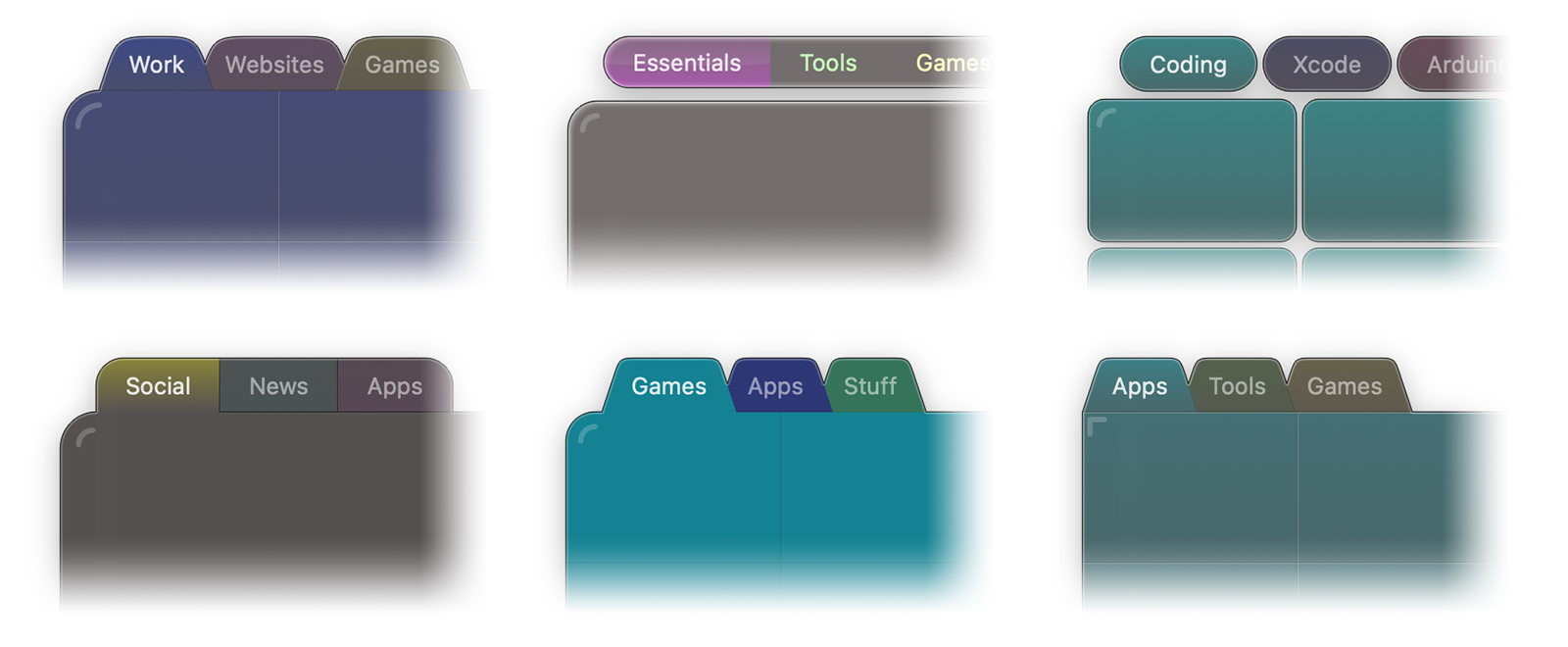
Something simple like this, see?

Image

For tabs there are three main groups: outside the shelf body but not connected to it, outside the shelf body and connected to it, and inside the shelf body (like the tabs in the colorization example in my previous post).

Outside the shelf body not connected you can have individual tab buttons (rounded or rectangular) like example #3 above (ignore that body type, though) or a single button area floating above the shelf as in example #2. Outside the box connected you can also have the overlapping tabs like example #5 and #6 or non overlapping tabs like example #4.

As for body types, two main body types: one rectangular like example #6 above or with rounded corners, like in all the other examples.

BassdudeNZ wrote:
How many would you like? :D


Hmmm, I would say about 9 different themes perhaps, if you combine the possible variations above?

Above all, follow the KISS principle lol. :D Keep it SIMPLE and FLAT, as in the examples above.

BassdudeNZ wrote:
Also LAST - Do you want them in full theme variants or just the png's?


Full wsw theme. But! Only do the shelves, do not do modules, docks, or anything else.

Also, since the idea is for these themes to be used as "templates", use the same basic color or soft gradient for all of them. The idea is to let the user colorize the themes to whatever they want.

Anyway, take your time... I am not expecting to include these "template" themes in this release.

In the mean time I will release beta 11 so you can see what happens when you apply different colorizations, etc...

_________________
Jorge Coelho
Winstep Xtreme - Xtreme Power!
https://www.winstep.net - Winstep Software Technologies


Back to top
 Profile WWW 
 
 Post subject: Re: So, what's next after v26.6 ?
PostPosted: Fri Sep 18, 2026 2:34 am 
Offline
User avatar

Joined: Thu Sep 08, 2016 10:10 pm
Posts: 861
winstep wrote:

In the mean time I will release beta 11 so you can see what happens when you apply different colorizations, etc...


Great !!
I will use the kiss method for the majority (90%)... I'll leave an option for bells and whistles on one only if it works ( the 'if' being the operative word).

having them there makes it easy so I'll do my best to follow your instructions to the letter (except for one :) )


Ifg you have the bed graphics and they are not in the BETA, please send them to me. That will make it a shitload easier :)

_________________
"They teach you there's a boundary line to music. But, man, there's no boundary line to art."
-Charlie Parker

“We can't expect a blind man to appreciate beautiful patterns or a deaf man to listen to bells and drums.”
― Zhuangzi


Back to top
 Profile  
 
 Post subject: Re: So, what's next after v26.6 ?
PostPosted: Sat Sep 19, 2026 12:01 am 
Offline
Site Admin
Site Admin
User avatar

Joined: Thu Feb 26, 2004 8:30 pm
Posts: 13470
Nearly all - if not all - modern themes use PNG bitmaps for their various objects. This is because PNG files have built-in support for transparency and an alpha channel.

But native PNG support through GDI+ only appeared in the Windows XP days, while Winstep applications go all the way back to Windows 9x. So how did we create themes back then?

We used BMP files and something called "magic pink" to represent full transparency - essentially, a color key. Anything using that specific shade of pink was rendered as transparent through the use of complex window regions. Semi-transparency was not possible, though: a pixel was either fully transparent or fully opaque.

Anyway, I was just adding tab colorization support to these legacy themes and used the old default OPENSTEP EUI theme for testing. This theme uses a gray texture for the active tab and Shelf body, and a green texture for the inactive tabs.

Attachment:
e2ac674d-2e6c-4ff6-a1de-30be7a9b75e4.png
e2ac674d-2e6c-4ff6-a1de-30be7a9b75e4.png [ 114.08 KiB | Viewed 2364 times ]

The Tint colorization method is able to colorize the gray active texture:

Attachment:
e8955744-ce34-4d70-ab3e-30136d5fe9f8.png
e8955744-ce34-4d70-ab3e-30136d5fe9f8.png [ 112.81 KiB | Viewed 2364 times ]

The Hue Shift method, however, cannot - simply because gray has no hue to shift:

Attachment:
7294a00d-637c-47d2-83e7-5629cb9145ef.png
7294a00d-637c-47d2-83e7-5629cb9145ef.png [ 106.87 KiB | Viewed 2364 times ]

Therefore, when using Hue Shift, whichever tab you select becomes gray because gray is the original color of the texture used for both the active tab and the Shelf body.

This little "accident" made me realize that it might actually be useful to add another tab colorization option - one that makes the active tab, and optionally the Shelf body, always use a specific color regardless of which tab is currently active.

So I am thinking of adding a Use fixed color for active tab setting, with a color selector beside it. When enabled:

1. Inactive tabs retain their individually assigned colors.
2. The active tab always uses the selected fixed color.
3. If Colorize Shelf Body with Active Tab color is enabled, the Shelf body also uses that fixed color.

I think this could arguably be even more useful than making the body follow each tab's individual color. A fixed active color would provide a stable, immediate visual indication of which tab is selected, while the inactive tab colors could continue to represent different categories.

Enabling Shelf body colorization would then turn that fixed color into a stable accent for the whole Shelf, rather than making the entire Shelf change color whenever a different tab is selected.

_________________
Jorge Coelho
Winstep Xtreme - Xtreme Power!
https://www.winstep.net - Winstep Software Technologies


Back to top
 Profile WWW 
 
 Post subject: Re: So, what's next after v26.6 ?
PostPosted: Sat Sep 19, 2026 4:16 am 
Offline
User avatar

Joined: Thu Sep 08, 2016 10:10 pm
Posts: 861
winstep wrote:


The Hue Shift method, however, cannot - simply because gray has no hue to shift:


I have no idea how they did this or the method but this is your grey which I shifted. You mentioned 'colorize' below. what seems to happen when I have used this on greys, is it colorizes it first which you can select then you lighten or darken /luminosity, and saturate accordingly to taste. So maybe inserting a colorize before the hue which would be an extra step would enable the changing of grey? I have used this many times and I have no idea how it is done but it does colorize greys.
Attachment:
colorize.jpg
colorize.jpg [ 117.52 KiB | Viewed 2355 times ]

_________________
"They teach you there's a boundary line to music. But, man, there's no boundary line to art."
-Charlie Parker

“We can't expect a blind man to appreciate beautiful patterns or a deaf man to listen to bells and drums.”
― Zhuangzi


Back to top
 Profile  
 
 Post subject: Re: So, what's next after v26.6 ?
PostPosted: Sat Sep 19, 2026 4:03 pm 
Offline
Site Admin
Site Admin
User avatar

Joined: Thu Feb 26, 2004 8:30 pm
Posts: 13470
New Betas of v26.9 (Beta 11) are out:

Winstep Xtreme beta:
https://www.winstep.net/xtreme-beta.zip

Nexus Ultimate beta:
https://www.winstep.net/ultimate-beta.zip

Nexus free beta:
https://www.winstep.net/nexus-beta.zip

This is a beta and MUST be installed ON TOP of a full v26.6 OR LATER installation. Do NOT uninstall anything first, just exit all running Winstep applications and run the beta setup file.

There is no need to backup your settings first, but it does not hurt if you do either.

###

I know I said this before, but this REALLY should be the last beta before the official release, and I do want to release it ASAP. :D

In this beta we fixed NextSTART silently crashing on exit, added options to colorize the Shelf body using the active tab color and to use a fixed color for the active tab, and introduced lazy icon rendering during smooth scrolling to greatly improve responsiveness when browsing large folders containing icons that are slow to load. We also fixed inconsistent margins in Windows 11-style taskbar thumbnail previews, the icon alignment setting in full-screen-width docks reverting to centered after a restart, and sub-dock icons appearing without a background tile in tiled docks.

This beta also includes the up-to-date User Guides, which is why it is slightly larger than previous beta releases - I decided NOT to use monolithic help files with embedded screenshots but rather individual htm and image files. This way I don't have to include a single multiple MB help file every time there is a small change in the User Guide.

_________________
Jorge Coelho
Winstep Xtreme - Xtreme Power!
https://www.winstep.net - Winstep Software Technologies


Back to top
 Profile WWW 
 
 Post subject: Re: So, what's next after v26.6 ?
PostPosted: Sun Sep 20, 2026 7:32 pm 
Offline
User avatar

Joined: Thu Sep 08, 2016 10:10 pm
Posts: 861
winstep wrote:
added options to colorize the Shelf body using the active tab color and to use a fixed color for the active tab,.


The coloring works well.
Will get onto a few flat workshelves. do you want buttons as well? I figure you want them in the existing format, not a block, but with separate active/inactive buttons. Theoretically, if the intent is purely for coloration, an inactive seems unnecessary as the same button can be used for all. let me know

_________________
"They teach you there's a boundary line to music. But, man, there's no boundary line to art."
-Charlie Parker

“We can't expect a blind man to appreciate beautiful patterns or a deaf man to listen to bells and drums.”
― Zhuangzi


Back to top
 Profile  
 
 Post subject: Re: So, what's next after v26.6 ?
PostPosted: Mon Sep 21, 2026 6:06 pm 
Offline
Site Admin
Site Admin
User avatar

Joined: Thu Feb 26, 2004 8:30 pm
Posts: 13470
BassdudeNZ wrote:
Theoretically, if the intent is purely for coloration, an inactive seems unnecessary as the same button can be used for all.


Not true, the buttons are not being colorized by the tab colorization settings.

_________________
Jorge Coelho
Winstep Xtreme - Xtreme Power!
https://www.winstep.net - Winstep Software Technologies


Back to top
 Profile WWW 
 
Post new topic Reply to topic Board index : Winstep Forums : General Discussion  [ 199 posts ] Go to page Previous  1 ... 8, 9, 10, 11, 12, 13, 14  Next
Display posts from previous:  Sort by  

Who is online

Users browsing this forum: Amazon [Bot], Bing [Bot], Google [Bot] and 198 guests


You cannot post new topics in this forum
You cannot reply to topics in this forum
You cannot edit your posts in this forum
You cannot delete your posts in this forum
You cannot post attachments in this forum

Search for:
Jump to: