Winstep

Software Technologies


 Winstep Forums


Print view
Board index : Winstep Forums : General Discussion  [ 5 posts ]
Author Message
 Post subject: Winstep Extreme numbers my monitors differently from Windows
PostPosted: Sun Apr 12, 2026 7:34 pm 
Offline

Joined: Thu Oct 11, 2018 4:40 pm
Posts: 23
Hi, is there a way to make Winstep's monitor numbers match Windows settings?

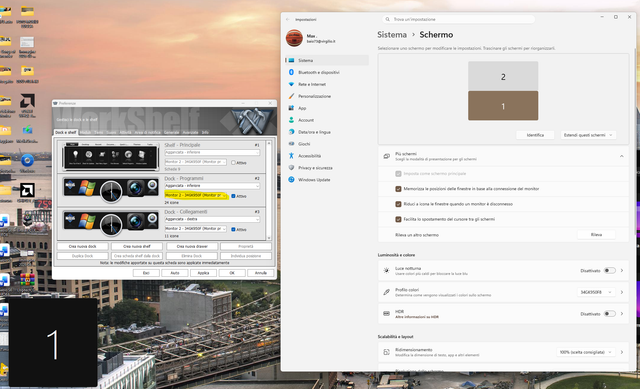
Here what I mean:

Image

In this picture you can see my 2 monitors stacked (and they are also phisically stacked) with main monitor 1 down and monitor 2 up, but Winstep Extreme inverts the numbers, calling monitor 2 the main one.
Is there anyway to fix?
Thanks.

Baio


Back to top
 Profile  
 
 Post subject: Re: Winstep Extreme numbers my monitors differently from Win
PostPosted: Mon Apr 13, 2026 3:50 pm 
Offline
Site Admin
Site Admin
User avatar

Joined: Thu Feb 26, 2004 8:30 pm
Posts: 13058
There is nothing to fix.

In fact, perhaps you should ask Microsoft to change the way they number the monitors instead. :D Let me explain:

Winstep numbers monitors according to their logical order, top to bottom, left to right. So, you always know that monitor 1 is to the left or to the top (or both) of monitor 2, for instance.

Microsoft numbers monitors according to hardware ID.

Now you tell me, which numbering scheme makes more sense?

_________________
Jorge Coelho
Winstep Xtreme - Xtreme Power!
https://www.winstep.net - Winstep Software Technologies


Back to top
 Profile WWW 
 
 Post subject: Re: Winstep Extreme numbers my monitors differently from Win
PostPosted: Tue Apr 14, 2026 7:41 am 
Offline

Joined: Thu Oct 11, 2018 4:40 pm
Posts: 23
Thanks for your replay.
I may agree with you but if Winstep Xtreme is working in Windows ambient, it should deal with it... I've tried to change the monitors layout in Settings by putting the lower one a little more on the left but didn't solve (and I can't put it on top because I'm using the lower one as primary), so I suspect Winstep marks as 1 the topper one and not the lefter.
Don't take me wrong, I'm trying to troubleshoot an issue I'm experiencing since november with AMD Adrenalin Panel not opening, and I'm looking for every possibile solution. Yesterdary I enabled left Taskbar within Start11 and suddendly out of nowhere the Panel once opened, so I'm asking myself if the issue is related to the way Windows and other softwares number the monitors.

Baio


Back to top
 Profile  
 
 Post subject: Re: Winstep Extreme numbers my monitors differently from Win
PostPosted: Tue Apr 14, 2026 12:33 pm 
Offline
Site Admin
Site Admin
User avatar

Joined: Thu Feb 26, 2004 8:30 pm
Posts: 13058
Baio73 wrote:
I may agree with you but if Winstep Xtreme is working in Windows ambient, it should deal with it...


Again, blame Microsoft.

I remember this whole "monitor numbering" issue started YEARS ago when Microsoft changed how monitors were numbered. This was a real pain point for developers, and it showed up in blog posts and forum arguments back in the Windows 8 / Windows 10 transition era.

Before, in the Windows XP and Windows 7 era, monitors were typically enumerated in a stable, predictable order (e.g. DISPLAY1, DISPLAY2) and were relatively consistent across reboots.

After Windows 7 monitor numbering became dynamic and not guaranteed stable, with IDs depending on GPU driver, connection order/ports, EDID/hardware IDs, internal topology, etc... Windows may even reassign numbers between boots or reconnections.

So, you cannot reliably map “DISPLAY2” to a physical monitor anymore and, in practice, the number is now just a label, not an identity - even Microsoft basically treats it as “for UI only” and does not expose the number THEY actually use.

You can easily end up with:

Code:
API Name   UI Number

DISPLAY1   3
DISPLAY2   1
DISPLAY3   2


TL;DR; 3rd party software cannot rely on Microsoft's exposed display numbering to identify monitors.

Baio73 wrote:
I'm asking myself if the issue is related to the way Windows and other softwares number the monitors.


I doubt that very much. The actual monitor number, as I stated above, is just a "representation" for humans to see, internally the software uses monitor handles and the structures don't even have a "monitor number" (or at least not one you can rely upon), so...

_________________
Jorge Coelho
Winstep Xtreme - Xtreme Power!
https://www.winstep.net - Winstep Software Technologies


Back to top
 Profile WWW 
 
 Post subject: Re: Winstep Extreme numbers my monitors differently from Win
PostPosted: Wed Apr 15, 2026 11:30 am 
Offline

Joined: Thu Oct 11, 2018 4:40 pm
Posts: 23
What you wrote is absolutely reasonable, But I'm so desperate for this problem that I have to try everything.
Thanks for your support!

Baio


Back to top
 Profile  
 
Post new topic Reply to topic Board index : Winstep Forums : General Discussion  [ 5 posts ]
Display posts from previous:  Sort by  

Who is online

Users browsing this forum: Amazon [Bot], GPT [Bot] and 9 guests


You cannot post new topics in this forum
You cannot reply to topics in this forum
You cannot edit your posts in this forum
You cannot delete your posts in this forum
You cannot post attachments in this forum

Search for:
Jump to: